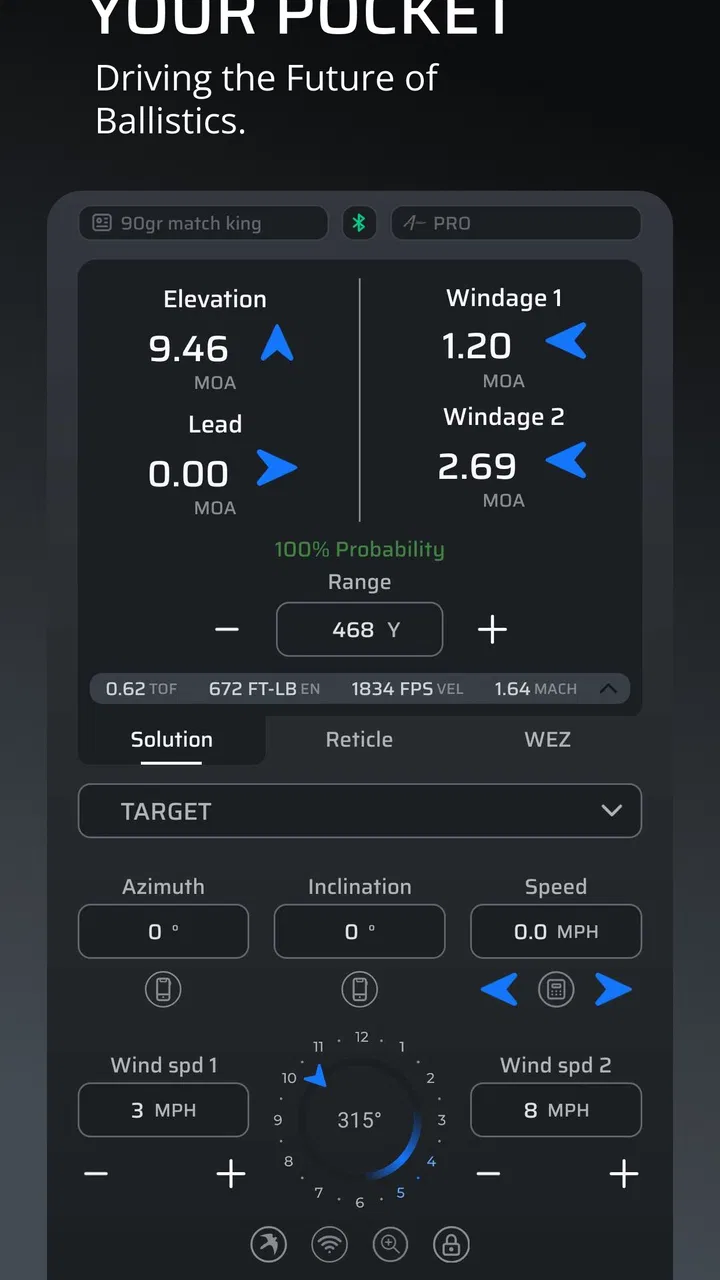
Applied Ballistics Quantum
- 4.6
- Rating
- 100.00K
- Installs
- Free
- Price

 Analysis by App-foxy
I approached Applied Ballistics Quantum as a practical sports tool rather than something to open casually for a quick calculation. It is designed for people who want a more disciplined way to work through ballistic information, and that focus becomes clear almost immediately. The app rewards careful input, repeatable habits, and a willingness to understand what each setting changes. It is not trying to be a flashy companion that hides the work behind a single oversized button.
That makes it appealing to experienced shooters who already know why small changes in conditions matter. It can also help a learner build better habits, provided they are prepared to check their inputs instead of treating every displayed result as an unquestionable answer. In my experience, the strongest part of the app is not simply producing a solution; it is encouraging a consistent process from one session to the next.
Building a dependable baseline before chasing speed
The best way to start is with one carefully prepared profile and one familiar use case. I would not begin by entering several setups at once or changing every available option just to see what happens. A cleaner approach is to choose the equipment and ammunition combination you use most often, enter its known information carefully, and then keep that configuration as your reference point.
You May Also Like

 Blood Strike: 2.5 Anniversary
Blood Strike’s Loadouts Turn Every Drop Into a Tactical Gamble
A close look at Blood Strike’s custom loadouts: how fast access to signature weapons reshapes its battle royale rhythm, rewards preparation, and narrows the gap between fights.

 Pandora - Music & Podcasts
Pandora’s Music Is Easy to Start, but Harder to Recover
Pandora’s strength is its low-effort path from a seed to a station. Its weak spot is how much confidence it asks you to place in connection, setup, and quiet recovery.

 8 Ball Pool
 Is Built on Rivalries, Rematches, and Routine
A close look at the rivalries, rematches, shared routines, and unanswered safety questions that turn a quick pool match into a persistent mobile community.

 Samsung Music
’s Quiet Strength Is Playing What You Already Own
Its reach comes less from spectacle than from dependable access to a personal library. That simplicity is both the app’s strongest retention engine and its ceiling.

 AccuWeather: Weather Radar
AccuWeather Review: A Quick, Clear Forecast for Everyday Decisions
For everyday plans, the best forecast is the one you can understand quickly. AccuWeather makes rain timing, radar, and local conditions easy to act on, with a few trade-offs.

 Hill Climb Racing
Why Hill Climb Racing Still Turns Crashes Into One More Run
A tiny car, a bumpy hill and one more upgrade: Hill Climb Racing keeps resurfacing because its simple chaos makes every near-miss feel personal.
More From Our News Desk



This matters because a ballistic calculator is only as useful as the information behind it. If the sight height, projectile details, zero information, or environmental inputs are inconsistent, a polished result can still lead you in the wrong direction. Quantum is most valuable when I use it as part of a repeatable routine: confirm the profile, confirm the conditions, review the output, and only then make a decision.
For a typical range day, I would prepare the main profile before leaving rather than trying to build it while standing beside the firing line. That leaves the app serving as a check and adjustment tool instead of becoming a source of rushed data entry. It also makes it easier to notice whether a surprising result comes from a changed condition or from an accidental edit.
A useful habit is to treat every session as a comparison against a known baseline. If the result differs from what you expected, I would first inspect the inputs before assuming the model is at fault. Check the selected profile, the distance, the zero, and the environmental information in a fixed order. This simple sequence prevents the common mistake of correcting a real-world observation with an unnecessary change to the underlying setup.
The app sits in the sports category, but it feels more specialized than the casual label suggests. It is not a general shooting log or a social range community. Its purpose is concentrated: help the user work with ballistic calculations in a structured way. That narrow purpose is a strength for the right audience, although it also means newcomers may need time to understand the vocabulary and the consequences of each field.
Settings that deserve attention before regular use
I would spend more time checking the configuration than trying to memorize the interface. The most important settings are the ones that define the relationship between your equipment, your sighting system, and the conditions in which you expect to use it. A profile that looks complete is not necessarily a profile that has been validated.
Start by checking units and display preferences. A result can be perfectly calculated yet awkward to use if it is shown in a format that does not match your optic, turret markings, or normal range language. Choosing a familiar presentation reduces mental conversion and lowers the chance of copying a value incorrectly. This is a small setting with a practical effect, especially when you are working quickly.
Next, review the zero information with care. It is tempting to think of a zero as a permanent fact, but the distance and conditions associated with it are part of the calculation. If your actual confirmation process used a different setup from the one entered in the app, the resulting table may appear precise while describing a different situation. I prefer to write down the assumptions I used during confirmation and keep the app aligned with them.
Environmental inputs deserve the same attention. Temperature, pressure, humidity, and wind are not decorative fields; they describe the air through which the projectile travels. If you enter a remembered value from earlier in the day, you may be asking the app to solve a different problem from the one in front of you. When conditions are changing, I find it more useful to update the relevant information deliberately than to make frequent random adjustments.
There is also a trade-off between detail and speed. More complete inputs can make the result more representative, but only if those inputs are trustworthy. An approximate value entered with false confidence is not automatically better than a simpler, honestly understood setup. My rule is to use the most reliable information available and recognize which parts of the result are sensitive to changing conditions.
Because the app is free to install but includes in-app purchases ranging from $1.99 to $299.99 per item, I would inspect the available options before assuming that every capability is part of the basic experience. The free entry point is useful for deciding whether the workflow suits you, while the wide purchase range means serious users should identify which additions are actually relevant to their needs rather than buying broadly.
Faster patterns that preserve accuracy
Once the baseline is sound, speed comes from reducing repeated decisions. I like to organize my use around a small number of established profiles instead of rebuilding the same information every time. The less often I retype stable equipment details, the fewer opportunities I create for a spelling error, a misplaced decimal, or an overlooked field.
Another efficient pattern is to separate preparation from interpretation. Before a session, I prepare the profile and review the settings. During the session, I focus on current conditions and the specific distance or problem I am trying to solve. Afterward, I compare what happened with what I expected. This division keeps the app from becoming a frantic calculator and turns it into part of a learning loop.
When I need to work quickly, I follow the same screen order every time. I verify the selected setup, check the distance, confirm environmental information, and then read the output. A fixed sequence is more valuable than simply knowing where buttons are, because it protects against skipping a field when attention is divided.
I would also avoid making several changes between observations. If you alter the profile, update the weather, and change the distance all at once, you lose the ability to tell which factor affected the result. Experienced use is often less about finding a secret shortcut and more about making one controlled change at a time.
This is where Quantum can feel more capable than a basic range card or a simple phone calculator. Those alternatives may be quicker for a familiar, fixed setup, but they often encourage users to rely on a static reference. A dedicated ballistic application is better when the situation changes and you need to understand which assumptions are being carried into the answer.
On the other hand, a printed card can still be the better tool when your setup is already confirmed and you need something that can be read without managing a phone. I would not replace a simple, trusted reference solely because an app offers more calculations. The sensible combination is to use Quantum for preparation and refinement, then keep a straightforward reference for moments when speed, visibility, or battery independence matters more.
Where advanced use reaches its limits
The app should not be treated as a substitute for confirmation in the real world. A calculator can model a trajectory from the information it receives, but it cannot correct an incorrectly measured sight height, an unverified velocity, a misunderstood wind call, or equipment that behaves differently from its assumed specification. That distinction is especially important for users who are impressed by the precision of the displayed output.
I also think the learning curve is a genuine limitation. Someone who only wants a quick estimate may find the number of concepts and choices excessive. The app is a poor fit for a person who expects the first screen to explain every term or who does not want to maintain separate equipment information. A simpler calculator may be more comfortable for occasional use, even if it offers less depth.
Another limitation is cognitive rather than technical: more information can create the illusion of certainty. When several environmental values are available, it is easy to spend time refining numbers that are only loosely known. I get better results by identifying the inputs that are genuinely measured and treating the rest with appropriate caution. Precision in the display does not guarantee precision in the field.
Phone use itself can introduce friction. Bright light, cold hands, gloves, rain, or a busy firing line are not ideal conditions for detailed data entry. I would prepare as much as possible beforehand and keep the live interaction short. This is also why I would avoid depending on the app as the only record of an important setup.
The developer, Applied Ballistics, gives the app a clear specialist identity, and that focus is reflected in the way it asks the user to engage with the subject. It is not designed around entertainment or broad lifestyle features. That is good news for a technically minded user, but less attractive if you want a lightweight sports app that offers motivation, sharing, or general practice tracking.
The current version is 3.7.11, and the app supports devices running Android 8.0 or later. For most people considering installation, the practical question is less about the age of the platform and more about whether their phone can be used comfortably in their normal environment. I would check the device requirement before planning a field workflow, especially if you use an older handset as a dedicated range phone.
Who will get the most from it?
I would recommend Quantum to a shooter who already understands the basic relationship between zero, distance, projectile behavior, and atmospheric conditions, or who is genuinely willing to learn those ideas. It is particularly useful for someone maintaining more than one carefully documented setup and wanting a consistent way to compare results.
It can also serve a serious beginner, but I would use it alongside instruction and practical confirmation rather than in isolation. The app can show how changing an input affects a solution, which is educational, but it cannot tell you whether your original measurement was made correctly. Learning the reasoning behind the fields is more important than filling them quickly.
I would skip it if your needs stop at a single familiar distance and a basic reference card already solves the problem. I would also look elsewhere if you want a polished training diary, a social experience, or a very simple interface with almost no setup. Quantum is strongest when the user values control and repeatability more than instant simplicity.
The audience size is reflected in its reception: it holds a 4.6 average from around 2.1 thousand ratings, with over 100 thousand installs. Those figures suggest a solid specialist following rather than a mass-market sports audience. I read that as a useful signal for prospective users: the app has enough adoption to be established, but its appeal still depends heavily on whether you enjoy a technical workflow.
Its Everyone content rating may make it broadly accessible from a store perspective, but that should not be confused with being effortless for every age or experience level. The subject matter requires responsible judgment, careful handling of equipment, and respect for local rules and safe practice. The app can support preparation; it should never replace those responsibilities.
My working verdict after settling into the workflow
What I like most is the way the app rewards consistency. After I stop treating it as a one-tap answer machine, it becomes much more useful. A stable profile, checked settings, controlled changes, and a habit of comparing predictions with observations create a workflow that is more valuable than any individual result.
The main weakness is the same feature that gives it depth: it expects the user to participate. You need to understand what you are entering, keep your profiles organized, and resist the temptation to mistake a detailed calculation for a guaranteed outcome. That is a fair trade for a specialist tool, but it is still a trade.
For someone deciding whether to try it, I would install the free version and begin with one familiar setup. Spend the first session checking units, zero assumptions, and environmental entries rather than exploring every possible option. If that process feels useful instead of burdensome, the app is likely to earn a regular place in your preparation routine. If it feels like unnecessary administration, a simpler calculator or a confirmed reference card will probably serve you better.
My final view is positive, with an important qualification: the real advantage is a repeatable method, not just a more elaborate number. Applied Ballistics Quantum is a focused sports app for people who want to work carefully with ballistic information and understand the assumptions behind their results. I would recommend it to methodical users who are ready to validate their inputs and keep their habits consistent, while steering casual users toward a simpler alternative.
After using it in that disciplined way, I see why it has remained relevant since its release on May 14, 2012. It does not need to behave like a general-purpose phone app. Its value comes from giving a serious user a structured place to prepare, check, and refine a ballistic solution. That makes it worth trying, as long as you approach it as one part of responsible real-world practice rather than as a replacement for it.
FAQs for Applied Ballistics Quantum
01What is Applied Ballistics Quantum used for?
Applied Ballistics Quantum is a precision shooting application designed to help shooters calculate ballistic solutions for rifles and ammunition. It can account for factors such as bullet characteristics, muzzle velocity, atmospheric conditions, rifle orientation, and target distance. The app is mainly aimed at long-range and serious recreational shooters who want more detailed calculations than a basic range or trajectory calculator can provide.
02Does Applied Ballistics Quantum require special equipment or sensors?
The app can provide useful ballistic calculations with information entered manually, but its accuracy depends heavily on the quality of the data provided. Depending on the features and device setup, users may benefit from compatible weather meters, rangefinders, chronographs, or other supported equipment. These accessories are not necessarily required for basic use, although they can make field calculations faster and more reliable.
03Is Applied Ballistics Quantum suitable for beginners?
Applied Ballistics Quantum can be used by beginners, but it is primarily designed for users who are willing to learn the fundamentals of external ballistics. The interface and terminology may feel advanced if you have never worked with ballistic coefficients, drag models, zero distance, muzzle velocity, or atmospheric pressure. Beginners should expect to spend time configuring a rifle profile and checking the results against real-world data.
04How accurate are the ballistic results from Applied Ballistics Quantum?
The application can produce highly useful trajectory and firing solutions, but it cannot guarantee perfect results in every situation. Accuracy depends on correct bullet data, verified muzzle velocity, a properly measured zero, reliable environmental readings, and consistent shooting technique. Wind is especially difficult to predict because conditions can change between the firing position and the target. Users should always confirm calculations safely at the range.
05Is Applied Ballistics Quantum free to download, and does it work offline?
Availability, pricing, and included features may depend on the version offered for Android or iOS, so users should check the current store listing before downloading. Some advanced tools or ballistic libraries may require payment or in-app access. The app is intended for field use, and many core calculations can generally be prepared without continuous internet access, but certain updates, synchronization features, or external data services may require connectivity.
Pros
- Highly detailed ballistic calculations for serious long-range shooters.
- Supports multiple rifle
- ammunition
- and sight configurations.
- Accounts for atmospheric conditions and changing environmental inputs.
- Useful trajectory tables help with planning shots at different distances.
- Strong option for users who want advanced data beyond basic ballistic apps.
Cons
- The interface can feel complex for beginners and casual shooters.
- Many advanced features require accurate measurements and careful setup.
- Some tools and content may depend on a paid subscription or purchase.
- Results are only as reliable as the ammunition and firearm data entered.
- Frequent field use may require manual weather updates for best accuracy.

Applied Ballistics Quantum
Gallery